Quantum Edge: Quantum Prompt Optimisation on iPhone & iPad
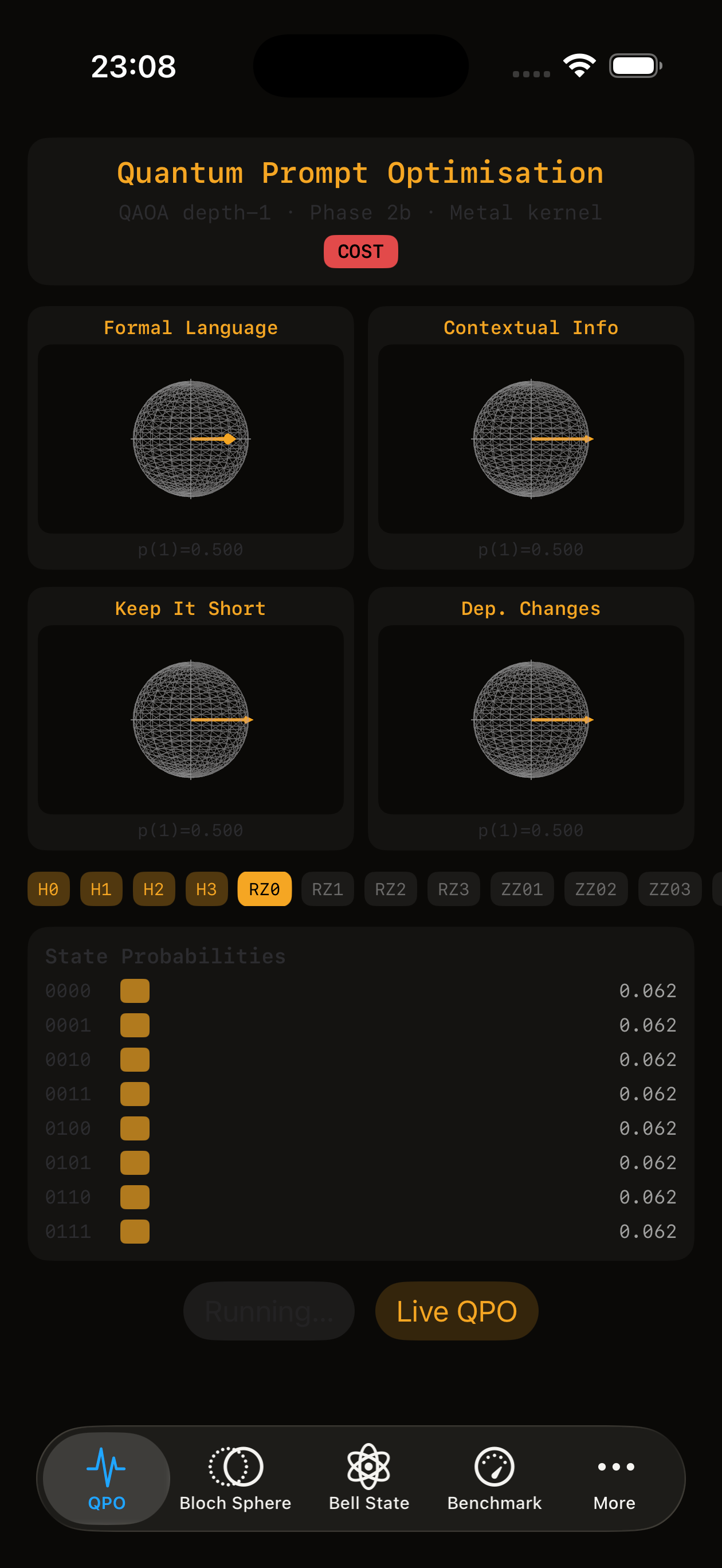
Quantum Edge is an iOS app that runs real quantum circuits — statevector simulation, gate by gate — natively on Apple’s Metal GPU. No cloud dependency, no server-side simulator, no Python interpreter. 2MB installed. Its flagship demo is QPO: quantum prompt optimisation, a QAOA circuit that searches the combinatorial feature space of a prompt using a genuine quantum algorithm, running on the phone in your pocket.
Get Quantum Edge on the App Store →
What is quantum prompt optimisation?
Prompt quality isn’t a linear scoring problem — feature interactions determine outcomes in ways greedy, one-factor-at-a-time scoring can’t capture. QPO (Quantum Prompt Optimisation) formulates prompt feature selection as a QUBO (Quadratic Unconstrained Binary Optimization) problem and solves it with QAOA (the Quantum Approximate Optimization Algorithm) — a variational quantum circuit that searches the feature space directly on gate-based quantum hardware, instead of approximating it with classical greedy search.
This isn’t a metaphor or a “quantum-inspired” heuristic running on a classical backend. It’s an actual parameterised quantum circuit — Hadamard initialisation, cost and mixer layers, measured amplitudes — executing gate by gate. In the Quantum Edge app you watch it happen: four qubits, animated circuit, Bloch sphere readout via partial trace, live on your device.
The research behind it (Phase 1 and Phase 2, published, plus a Zenodo preprint) found that the QAOA advantage is task-complexity-gated: on constrained-output tasks it converges to the same shortlist as classical greedy scoring, but on complex multi-factor tasks it found a higher-scoring prompt candidate the greedy scorer missed entirely. That’s the result QPO exists to demonstrate.
- QPO Phase 1 — preliminary findings (n=50) →
- QPO Phase 2 — off-diagonal QUBO (n=130) →
- QPO preprint on Zenodo →
How it works: on-device, not cloud-simulated
Most “quantum” demos you’ll find online run a classical simulator in a browser tab or a Streamlit app on someone’s server — Python, NumPy, a cloud instance doing the actual work while you watch a progress bar. Quantum Edge doesn’t do that.
The core is QuantumEdgeKit, a Metal compute kernel written in Swift. The statevector — the full quantum state of the system — lives in MTLBuffer shared memory that the GPU already owns. Gate operations are dispatched as GPU compute shaders. Swift calls Metal directly: no intermediate representation, no classical emulation layer, no interpreter between your code and the GPU’s instruction set.
That architecture is why the app is 2MB. PennyLane’s NumPy dependency alone is bigger than the entire install.
Benchmarks — the honest numbers
Quantum simulation on consumer hardware has a wall. Quantum Edge doesn’t hide it — it measures it and publishes it.
| Platform | Device | n=28 depth 4 | vs. Metal |
|---|---|---|---|
| Metal GPU | M1 iPad Pro (8GB) | ~9.3s | — |
| Metal GPU | iPhone 16 Pro Max, A18 Pro (8GB) | ~9.3s | — |
| Metal GPU | iPhone Air, A19 Pro (11GB usable) | ~10.3s | — |
| PennyLane CPU (float64) | M1 Pro MacBook (32GB) | 384.5s | 44x slower |
| Metal GPU | iPhone 13 Mini, A15 (3GB) | 331.91ms (n=27) | — |
The ceiling is n=28 qubits on every 8GB Apple device tested — M1 iPad Pro, iPhone 16 Pro Max, iPhone Air, all identical. A 28-qubit statevector is 2GB of complex floats; n=29 is 4GB, and the OS kills the process with an uncatchable SIGKILL. Cross-validated against PennyLane’s float64 CPU backend: max amplitude error ≤ 3×10⁻⁷, fidelity 1.0000000000. The float32 GPU math is correct — it’s just bounded by memory, not precision. Lower-RAM devices scale the same wall down proportionally — a 3GB iPhone 13 Mini reaches n=27 comfortably before memory becomes the limiting factor.
Get the app
Quantum Edge is free on the App Store. Six tabs: QPO (the quantum prompt optimisation demo), Bloch Sphere, Sequencer, Entanglement, Bell State, and the full Benchmark suite — sweep your own device’s qubit ceiling and copy the result with hardware specs attached.
Download Quantum Edge — App Store →
FAQ
What is quantum prompt optimisation? Quantum prompt optimisation (QPO) is a method for selecting the best combination of prompt features by formulating the selection as a QUBO problem and solving it with QAOA, a variational quantum algorithm — instead of scoring features one at a time with classical greedy search.
Is there an app for quantum prompt optimisation? Yes — Quantum Edge, free on the iOS App Store, runs the QPO QAOA circuit natively on-device via Metal, with a live animated view of the circuit and Bloch sphere readout.
Does quantum computing actually improve prompt engineering? Early results are task-dependent, and the caveat matters: whilst true quantum circuits have not yet been tested, on our Metal statevector simulator — the same QAOA circuit as the on-device app — simple, constrained-output tasks converge to the same answer as classical greedy search, while on complex, multi-factor tasks (tested against CVE risk assessment prompts) QAOA found a higher-scoring prompt candidate that greedy search missed (Zenodo preprint, 2026). Physical quantum hardware validation is a future research area. Full methodology and limits are in the published Phase 1 and Phase 2 results.
What hardware does Quantum Edge run on? Any iPhone or iPad with Metal support. Benchmarked ceiling is n=28 qubits on 8GB devices (M1 iPad Pro, iPhone 16 Pro Max, iPhone Air) — the wall is memory, not chip generation.
Does Quantum Edge use a cloud quantum computer or a simulator? Neither, in the way most tools do. It’s a local statevector simulator, but it runs entirely on-device via a native Metal GPU kernel — no server round-trip, no browser-hosted simulator, no cloud queue.