mark-comms: Margin Comments for Markdown Drafts
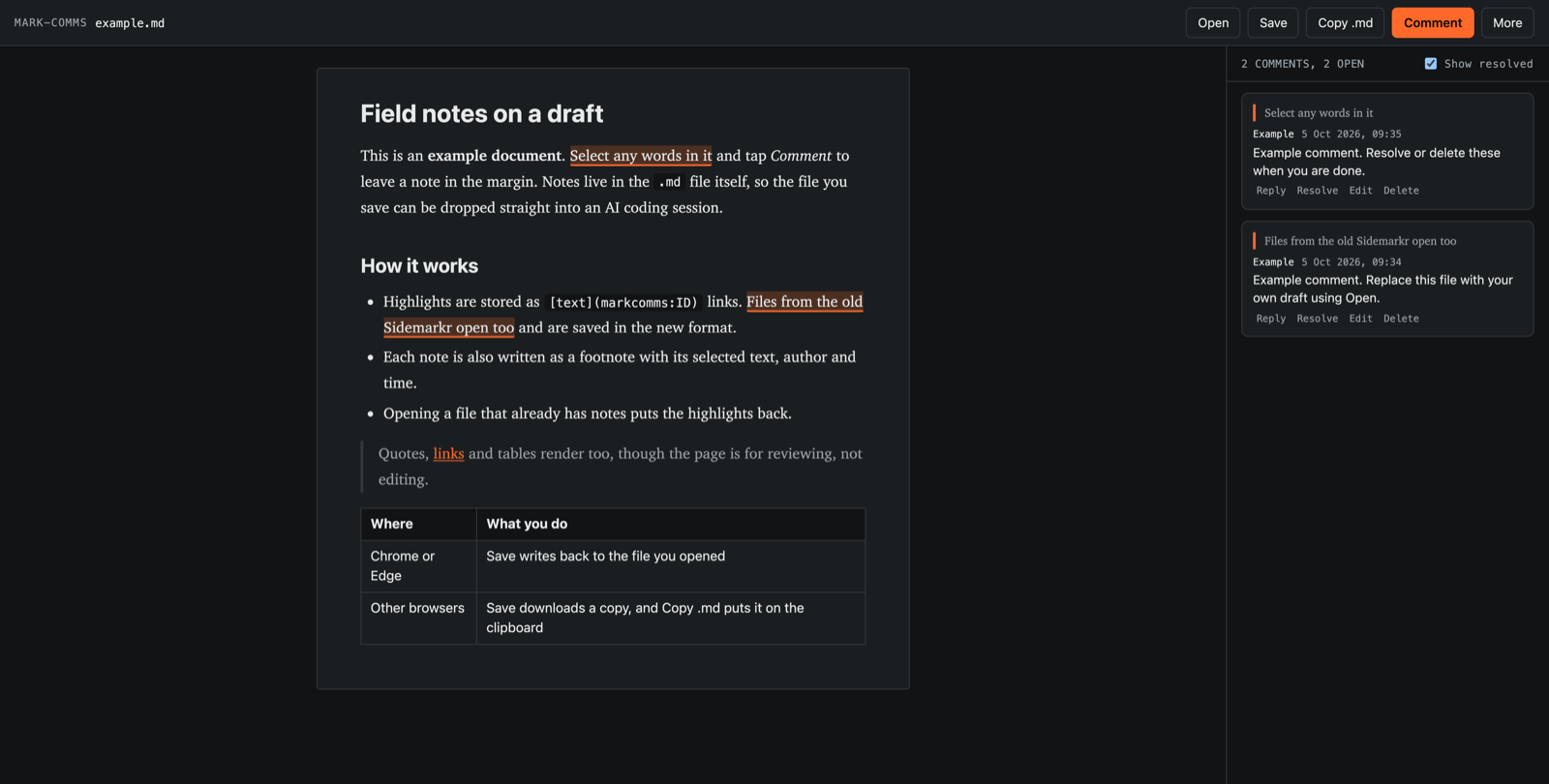
mark-comms is a small tool for reviewing a markdown draft. Open a file, select some words, and leave a comment on them. When you save, the comments go back into the same .md file as plain text.
That last part is the point. The file is the only thing you have to carry around. Drop it into an editor, a repo, or an AI coding session, and whoever reads it sees your highlights and your notes with no export step.
What it does
- Select text in the rendered draft and add a comment.
- Reply to a comment, edit it, resolve it, or delete it.
- Click a highlight to jump to its comment, or a comment to jump to its highlight.
- Open a file that already has comments and the highlights come back.
It is a reviewer, not an editor. The draft is read-only on the page. You change the words somewhere else, and the next time you open the file, any comment whose text has moved is marked “text not found” instead of being dropped.
What gets written to the file
Each highlight becomes a markdown link with a markcomms: address, and each comment becomes a footnote at the bottom of the file that carries the selected text, the author and the time:
I [still think the direction is worth pursuing](markcomms:1f426188-88bd-45e8-a874-b206f9338d37).

## 💬 Comments

[^1]:
    <!-- markcomms: {"id":"1f426188-…","parentId":null,"selectedText":"still think the direction is worth pursuing","createdAt":"…","resolved":false,"orphaned":false,"offset":2,"length":43} -->
    **💬 Comment**
    ID: markcomms:1f426188-…
    Created: 2026-10-05T09:34:00.000Z
    _Selected text: "still think the direction is worth pursuing"_
    **Me:** Say why. The paper didn't show this.
Every comment repeats its selected text, so the notes still make sense if someone reads only the footnotes.
Files from Sidemarkr
Sidemarkr was a web editor that used the same idea. mark-comms reads files it saved. The loader accepts both sidemarkr: and markcomms: tags, then saves everything in the new format.
We tested this on a real file with 21 comments. All 21 found their text again, and the draft text came back unchanged after a save.
Privacy
Your draft and comments are never uploaded. The tool has no server, no accounts, and no fonts or other scripts from third parties.
The one outside request is a page-view count. Like the rest of waratahlabs.com, this page and the tool use Umami to count how many times each page loads. Umami sets no cookies and does not record what is on the page or what you type, so it cannot see your draft. It only tells us which pages get attention. See the privacy policy. While you work, a copy of the draft is kept in your browser’s local storage so a closed tab doesn’t lose your comments. Clear your site data, or use “Discard draft” in the More menu, to remove it.
Limits
- Saving. In Chrome and Edge, Save writes back to the file you opened. In other browsers, Save downloads a copy, and Copy .md puts the text on the clipboard.
- Browsers. We have tested loading, commenting and the saved text in desktop Chrome. Writing back to the opened file, Safari and iPad are not tested yet.
- Formatting. Tables, lists, quotes, code and links render. HTML blocks and images do not.
- Highlights across formatting. If a selection starts inside bold text and ends outside it, the comment is saved as a footnote but the inline highlight tag is skipped, because it would break the markdown. The page tells you when this happens.
Status: working prototype
FAQ
What is mark-comms? A free, in-browser tool for highlighting text in a markdown document and attaching comments. The comments are stored in the markdown file itself.
Does it open Sidemarkr files?
Yes. It reads sidemarkr: tags and saves them back as markcomms: tags.
Where do my comments go?
Into the .md file when you save, as footnotes at the bottom, plus a link around each highlighted phrase. Nothing is sent to a server.
Can an AI assistant read the comments? Yes. They are plain text in the file, each with the text it refers to, so any tool that can read a markdown file can read them.
How is mark-comms different from other markdown review tools? Most tools for reviewing markdown alongside an AI agent need something installed. md-review is a command-line tool you install with npm, which opens a browser preview. Crit is a local program you run from a terminal. Others, such as Markdown Review, are VS Code extensions. mark-comms is a web page, so there is nothing to install, and the comments are kept inside the markdown file instead of in a separate review file.
The other tools do things this one doesn’t. Crit has plugins for coding agents like Claude Code and Cursor, so the agent can pick up your review on its own. With mark-comms you save the file and hand it over yourself. The draft is also read-only here, and it has only been tested in desktop Chrome. If you already work in a terminal or VS Code, one of those may fit better.
Is it free? Yes.